Welcome to HOA Chartered Accountants (A QCR-rated CA firm)
- Lahore, Pakistan
- info@hoacharteredaccountants.com


File Income Tax Return On FBR
IRIS For Salaried Individuals In Pakistan
Table of Contents
ToggleHow To File Income Tax Return On FBR IRIS For Salaried Individuals In Pakistan
If you are a salaried individual in Pakistan filing your income tax return on FBR IRIS for Tax Year 2026, you need to report your salary, tax deducted by your employer, other applicable income and financial information, complete the required Wealth Statement, reconcile the figures and submit the forms through IRIS. Tax Year 2026 covers income earned from 1 July 2025 to 30 June 2026.
Last checked: 7 October 2026. FBR extended the Tax Year 2026 filing deadline from 30 September to 15 October 2026 for persons whose returns were originally due on 30 September.
If you are filing for the first time, the difficult part is usually not entering your salary. It is knowing what information to prepare, which return form applies, how your income and tax details connect with the Wealth Statement, and how to confirm that your return has been successfully submitted.
Written by: Content Team
Reviewed by: Abdul Mannan, CA & California-Licensed CPA
Last reviewed: 08 October 2026
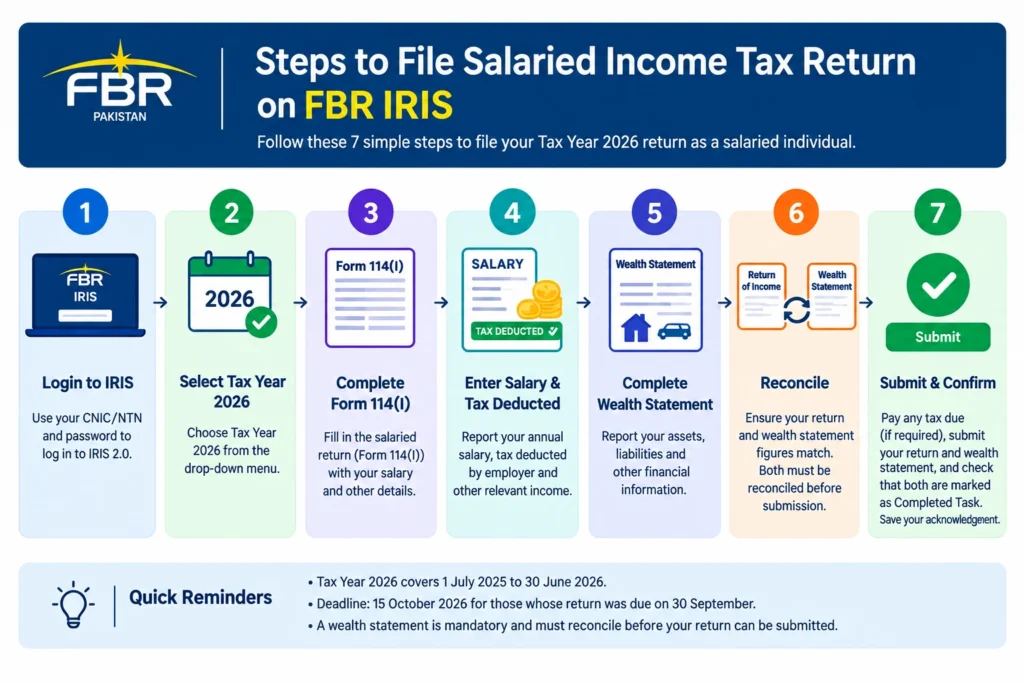
To file a salaried income tax return for Tax Year 2026:
- Log in to FBR IRIS 2.0 using your CNIC/NTN and password.
- Complete FBR registration/e-enrolment first if you are a first-time filer.
- Select Tax Year 2026 and open the applicable income tax return.
- Enter your salary and tax deducted by your employer.
- Report other applicable income, deductions or tax credits.
- Complete your Wealth Statement and reconcile the figures.
- Pay any tax due through a PSID, if applicable.
- Submit the income tax return and Wealth Statement.
- Confirm that the forms have moved from Draft to Completed Task and save your acknowledgement.
FBR’s online filing guidance requires the Return of Income and Wealth Statement, with the Wealth Statement reconciled before successful submission. The specific return form depends on your income profile, which is why you should confirm the applicable form before completing the return.
Tax Year 2026 deadline: 15 October 2026 for taxpayers whose returns were originally due on 30 September. Check FBR’s latest official communication if any further extension is announced.
What Do You Need Before Filing A Salaried Tax Return?
Before opening IRIS, prepare the information that supports your return. For a straightforward salaried taxpayer, this normally includes:
- CNIC and IRIS login credentials
- Annual salary certificate or salary statement
- Tax deduction information from your employer
- Details of any other income
- Bank balances and bank records
- Property, vehicle and investment information, where applicable
- Loans and other liabilities
- Major asset purchases or disposals during the year
- Previous year’s return and Wealth Statement, if you filed previously
- Supporting information for any applicable tax credit, reduction or exemption
The important point is to prepare the numbers before entering them into IRIS. FBR requires the Return of Income and Wealth Statement to be completed for online filing, and the Wealth Statement must reconcile before the return can be successfully submitted.
For a broader preparation checklist, you can explore the HOA’s Income Tax Return Checklist Pakistan 2026 guide.
Which FBR Form Does A Salaried Individual Use?
FBR provides Declaration Form 114(I) for individuals deriving income from salary and other sources where salary is more than 75% of total income.
This distinction matters. A person whose income is mainly salary may use the simplified salaried filing route, while someone with substantial business, rental, capital-gain or other income may need to consider the applicable return requirements rather than assuming the salaried form covers everything. If you have salary plus freelance, rental, investment, business or foreign income, identify those sources before starting the return.
How Do You File An Income Tax Return On FBR IRIS For Tax Year 2026?
The filing process can be broken into the following sequence:
- Log in or register with FBR.
- Select Tax Year 2026.
- Open the applicable income tax return.
- Enter salary and employer tax deductions.
- Declare other applicable income.
- Review the tax calculation.
- Complete the Wealth Statement.
- Reconcile income, expenses and changes in wealth.
- Pay any tax due through the applicable payment process.
- Submit the return and confirm the completed status.
FBR’s IRIS guidance confirms that taxpayers can access the return through the Declaration section and select the relevant tax period before entering employment and other information.
How Do You Log In To The FBR IRIS Portal?
Use the official FBR IRIS platform and sign in using your registered taxpayer credentials. FBR IRIS Portal If you are already registered but cannot access your account, use the available account-recovery or e-enrolment options rather than creating unnecessary duplicate registrations.
Which Tax Year Should You Select For Income Earned From July 2025 To June 2026?
Select Tax Year 2026. The relevant period is:
| Tax year | Income Period |
|---|---|
| Tax Year 2026 | 01 July 2025 - 30 June 2026 |
| Tax Year 2027 | 01 July 2026 - 30 June 2027 |
How Do You Enter Salary And Tax Deducted By Your Employer?
Use your employer’s annual salary certificate or equivalent payroll record.
Check:
- Gross salary and relevant taxable components
- Allowances and employment benefits where applicable
- Tax deducted by the employer
- Any other employment-related income
Do not automatically use the amount that reached your bank account as your annual salary. Your bank credit is the amount received after applicable deductions, while the return may require the relevant salary figure under the tax rules.
A useful practical check is:
Employer salary record → IRIS salary entry → tax deducted → final tax calculation
If these figures do not make sense together, resolve the difference before submitting.
How Do You Report Other Income On A Salaried Tax Return?
Salary should not be treated as your only income merely because you are an employee.
Depending on your circumstances, you may also need to report:
- Rental income
- Freelance or consultancy income
- Investment income
- Capital gains
- Business or professional income
- Other taxable income
- Relevant foreign income
The tax treatment of these sources can differ from salary. If your income is no longer predominantly salary, review the applicable return requirements before selecting a simplified filing route.
How Do You Review Your Tax Calculation Before Submission?
After entering your income and tax information, compare the IRIS calculation with your records.
Check:
| Check | What To Compare |
|---|---|
| Salary | Employer's annual record |
| Tax deducted | Employer's deduction record |
| Other income | Supporting records |
| Tax liability | IRIS calculation |
| Tax already paid | Withholding/payment evidence |
| Final balance | Payable or refundable amount |
If the result looks unexpectedly high or low, investigate the underlying figures instead of changing an entry simply to obtain a preferred tax amount.
What Is A Wealth Statement And How Do You Complete It?
A Wealth Statement records your assets, liabilities and financial position and explains how your wealth changed during the tax year. FBR states that the Wealth Statement must reconcile before the online income tax return can be successfully submitted.
For a salaried taxpayer, relevant information may include:
- Bank balances
- Cash in hand
- Property
- Vehicles
- Investments
- Other assets
- Loans and liabilities
- Personal and household expenses
- Major purchases
- Major asset disposals
How Does Wealth Statement Reconciliation Work?
A simplified way to understand the relationship is:
Opening Wealth + Income − Expenses = Closing Wealth
For example, if your opening net wealth was Rs. 5,000,000, your relevant income during the year was Rs. 2,500,000 and your expenses were Rs. 1,800,000, the resulting closing wealth would be Rs. 5,700,000 before considering the specific treatment of other financial movements.
This is an illustrative calculation, not a substitute for the figures and classifications required in your actual Wealth Statement. The practical question is: Can the change in your financial position be explained by your declared income, expenses and legitimate financial movements?
Why Is Your Wealth Statement Not Reconciling?
Common causes include:
- Incorrect opening wealth
- Missing bank balance
- Incorrect cash balance
- Asset purchased during the year not recorded
- Asset sale not reflected correctly
- Missing loan or liability
- Incorrect personal expenses
- Income omitted from the return
- Errors carried forward from an earlier filing
Do not insert an arbitrary balancing figure merely to make IRIS accept the statement. Investigate the actual difference.
FBR specifically states that the current-year change in wealth must correspond with the difference between income and expenses for successful reconciliation.
What Are The Income Tax Rates For Salaried Individuals In Tax Year 2026?
For Tax Year 2026, the salaried tax rates under the Finance Act 2025 are:
| Taxable Income | Tax |
|---|---|
| Up to Rs. 600,000 | 0% |
| Rs. 600,001-Rs. 1,200,000 | 1% of amount exceeding Rs. 600,000 |
| Rs. 1,200,001-Rs. 2,200,000 | Rs. 6.000 + 11% of amount exceeding Rs. 1.200,000 |
| Rs. 2,200,001-Rs. 3,200,000 | Rs. 116,000+23% of amount exceeding Rs. 2.200,000 |
| Rs. 3,200,001-Rs. 4,100,000 | Rs. 346.000 + 30% of amount exceeding Rs. 3,200,000 |
| Above Rs. 4.100,000 | Rs. 616,000 + 35% of amount exceeding Rs. 4.100,000 |
FBR lists a separate Tax Year 2026 withholding rate card updated under Finance Act 2025, so these figures should not be confused with the rates for Tax Year 2027.
For example, if illustrative taxable income is Rs. 1,500,000:
Rs. 6,000 + 11% × Rs. 300,000 = Rs. 39,000
The actual liability can differ where other income, applicable credits, exemptions, adjustments or other provisions affect the calculation.
What Is The Tax Year 2026 FBR Filing Deadline?
For taxpayers whose Tax Year 2026 return was originally due on 30 September, FBR extended the filing deadline to 15 October 2026 under section 214A of the Income Tax Ordinance, 2001. The extension was announced on 30 September 2026.
Because filing dates can change through official notifications, do not rely on an old article, social-media post or previous year’s extension. For broader deadline information, you can discover our FBR Tax Return Deadline 2026 guide on this.
Why Is Your FBR IRIS Return Not Submitting?
If IRIS does not allow you to complete the filing, check the problem in this order.
Why Is Your Wealth Statement Still Not Reconciling?
Review your:
- Opening wealth
- Income
- Expenses
- Bank balances
- Assets
- Liabilities
- Major purchases
- Asset disposals
The solution is normally to identify the missing or incorrect transaction rather than create a balancing entry.
Why Does Your Employer’s Tax Deduction Not Match IRIS?
Compare your employer’s salary or tax deduction record with the information appearing in IRIS. If there is a discrepancy, investigate whether the deduction was correctly deposited or recorded before submitting the return.
Why Is Your Return Still Showing As Draft?
FBR states that successful online submission is confirmed when both the Income Tax Return and Wealth Statement move from the Draft folder to Completed Task. Therefore, clicking a submission button is not enough. Check the final status of the relevant forms.
What If You Selected The Wrong Tax Year?
Stop and correct the selection before submitting. For income earned from 1 July 2025 to 30 June 2026, the relevant return is Tax Year 2026.
What Should You Keep After Filing Your Tax Return?
After successful submission, save:
- Submitted income tax return
- Wealth Statement
- Filing acknowledgement
- PSID, where applicable
- Payment/CPR record, where applicable
- Salary certificate
- Tax deduction evidence
- Relevant supporting financial records
FBR’s filing system provides a record of submitted income tax returns, while tax law also contains record-retention requirements. Section 174 generally provides for retention for six years, with important qualifications where proceedings remain pending.
Should You File Your Salaried Tax Return Yourself Or Use A Tax Consultant?
A straightforward salary-only return may be manageable if your records are complete and your Wealth Statement reconciles without difficulty.
The relevant question is not simply “How much does a tax consultant charge?” It is whether the complexity of your tax position makes professional review worthwhile.
For individuals and businesses that need more structured tax preparation or advisory support, HOA’s Tax Planning & Preparation services provide a natural next step without requiring every straightforward salaried taxpayer to outsource a simple return.
What Should You Check Before Submitting Your Salaried Tax Return?
Use this final checklist:
- Tax Year 2026 selected
- Salary agrees with employer records
- Employer tax deduction checked
- Other applicable income disclosed
- Relevant bank balances reviewed
- Assets reviewed
- Liabilities reviewed
- Personal expenses entered accurately
- Wealth Statement reconciled
- Tax calculation reviewed
- PSID/payment completed where required
- Income Tax Return submitted
- Wealth Statement submitted
- Both forms show Completed Task
- Filing acknowledgement saved
- Supporting records retained
How Can You Complete Your Tax Return Correctly The First Time?
Filing a salaried income tax return on FBR IRIS is not simply about entering your annual salary and clicking submit. A reliable filing process connects salary records, tax deducted, other income, assets, liabilities, expenses and the Wealth Statement.
For Tax Year 2026, start by selecting the correct tax year and preparing your records. Then report salary and applicable other income, check tax already deducted, complete the Wealth Statement and investigate any reconciliation difference before submission. Finally, confirm that both forms have moved from Draft to Completed Task. The goal is not merely to file quickly. It is to submit figures that accurately represent your tax position and financial records.
Frequently Asked Questions
Table of Contents
Newsletter
Subscribe our newleter
2026 © Hoa Charted Accountants. All Rights Reserved